OTA Acquisitions
OTA (over-the-air) acquisition covers stations collected via antenna rather than internet stream. OTA recorders use the prefix `CAP`.
Overview of OTA Collection
Unlike stream acquisition, OTA collection depends on a physical antenna receiving a broadcast signal. For the antenna to receive a reliable signal, it must be located within the station's broadcast radius — this makes the physical location of the data center a critical factor when setting up an OTA market. You can check a station's broadcast coverage using Radio Locator.
Even within the broadcast radius, collection quality can be affected by environmental and hardware variables such as weather conditions, antenna age, and the strength of the station's broadcast signal. These factors do not cause gaps in the recording — the server records continuously regardless of signal quality. Poor conditions instead manifest as static or audio degradation within the recording.
The only scenario that produces a gap in an OTA recording is a server-level outage at the market's data center — for example, if the server loses internet connectivity or experiences a power failure.
CAP and VPS Pairing
To mitigate the risks inherent in OTA collection, each OTA market is set up with two recorders: a CAP recorder collecting via antenna, and a VPS recorder collecting the same stations via internet stream. The stream acts as a backup — if the OTA recording fails or is degraded, the stream recording can be used as the client deliverable instead.
The priority is always to deliver the OTA source. The VPS stream is insurance — it exists to ensure uninterrupted delivery in cases where OTA collection is compromised.
There is a process for switching a station's client deliverable between its OTA source and its stream source when needed. See the Switching Sources section below for instructions.
Note: The CAP/VPS pairing applies to the current US OTA setup. Not all OTA deployments may follow this configuration.
Checking for OTA Outages
OTA outages can be identified in two ways: via the Recording Graphics in Command Centre, or via client reports that surface unusual drops in activity.
Checking for Outages via Recording Graphics
In the Recording Availability Graphics, blue blocks indicate recognized activity (normal) and green blocks indicate no activity was recognized for that period. A green block on an OTA station is a potential outage.
- Select the Rescan tab in Command Centre.
- Select yesterday and the day before as the date range.
- Select All US under markets.
- Click Recording Availability Graphics — a pop-up will open with the graphics.
- For any green station, cross-reference against the Expected Stations with No Activity section below to determine whether the absence of activity is due to station format.
- Open the recording in your browser and scrub through it to listen to the station's broadcast. This confirms whether the green blocks reflect a genuine collection issue or simply a non-ad-supported format. See Listening to Recordings for instructions.
- If the station is confirmed as an outage, follow the Switching Sources process to remove the OTA station from the client deliverable and replace it with the paired VPS stream.
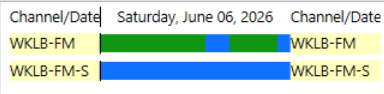
OTA source showing predominantly green blocks while the paired VPS stream is all blue — a strong indicator of a collection issue.
Checking for Outages via Client Reports
Because OTA quality issues manifest as degraded audio rather than gaps, they may not be immediately visible in the recording graphics. Client reports can help surface these issues by flagging unusual drops in activity over time. Two reports are particularly useful:
OTA vs. Stream comparison — Compares activity numbers between the CAP (OTA) and VPS (stream) recorders for the same station, trended over a couple of weeks. Since both recorders cover the same stations, their activity counts should track closely. A sustained divergence where the OTA source is significantly lower than the stream may indicate a quality issue with the OTA collection.
Week-over-week activity — Compares an OTA station's activity from one week to the same period the prior week. A notable and unexplained drop in activity week-over-week can be an early indicator of a collection issue before it becomes more apparent in the graphics.
Expected Stations with No Activity
Some stations in the OTA lineup are not ad-supported by format — these will consistently show green blocks and do not need to be reported. Station formats that typically carry no advertising include NPR and public radio stations, classical music stations, Christian radio, and community radio. Before reporting a green station as an outage, verify the station's format to confirm it is expected to carry ads.
If there is any doubt, the recording can be opened and scrubbed through directly in Command Centre to listen to the station's actual broadcast. Hearing the content firsthand confirms whether the absence of activity is due to station format rather than a collection issue.
Switching Sources
🚧 Coming soon — Instructions for switching a station's client deliverable between its OTA (
CAP) and stream (VPS) source will be added here.