Acquisitions
Ensuring all Adease media sources are collected and processed without deficiency.
Acquisitions is the ongoing process of ensuring all required media sources are being collected, monitored, and processed without deficiency. Recognized ad activity is stored in the database, surfaced to classification staff through AEMM (Adease's internal classification and ad management tool), and ultimately delivered to client-facing reports.
Command Centre
All radio and television acquisition monitoring is managed through Command Centre — a proprietary desktop application developed by Adease. It is the primary tool used every day to monitor recorder health, review recording graphics, manage stream URLs, and run rescans. If something goes wrong with a recording, Command Centre is where it gets identified and resolved.
For full details on the tool, see Command Centre.
Recording Methods
Each channel uses a different method to collect broadcast content.
Radio is collected via two methods: internet stream and over-the-air antenna (OTA). Canada Radio uses strictly internet streams. US Radio uses a mixture of both — some markets are stream-only, while others have both a stream and an OTA source.
Television is collected via a dedicated appliance in the data center that receives a signal feed directly from our supplier, Rogers. All television is classified as Canada TV, even though a small number of US television stations are also covered.
Flyers are collected digitally via the Flyer Monitor page on the Adease website and are not managed in Command Centre.
The Scanning Pipeline
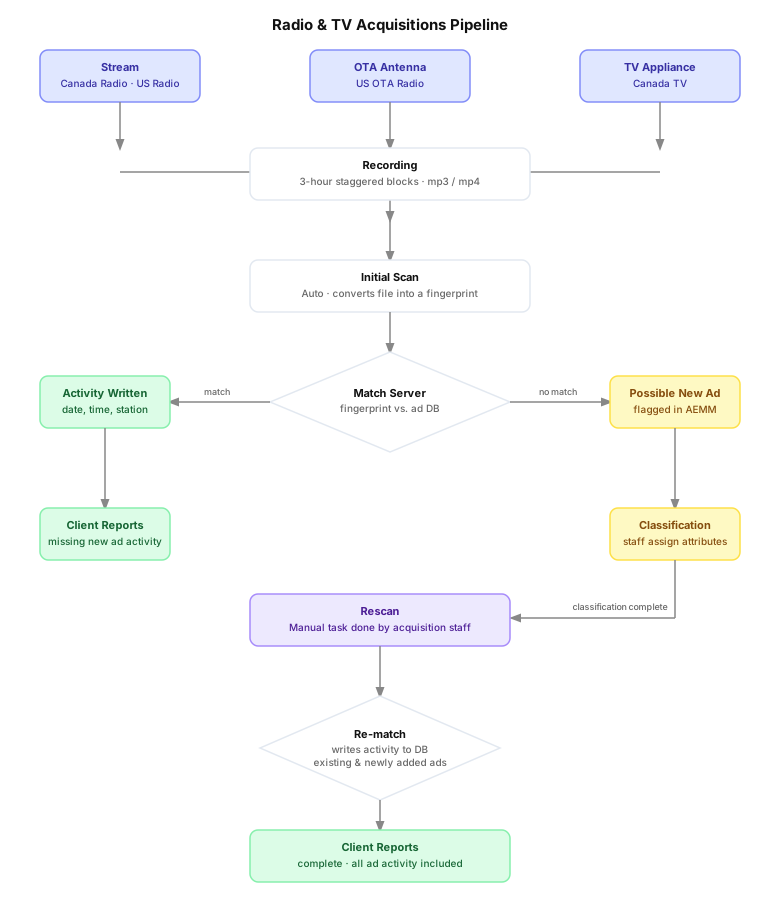
Once a 3-hour recording is complete, it moves through the following pipeline automatically — no manual intervention is required for the initial scan.
1. Initial Scan The recorded mp3 (audio) or mp4 (video) file is converted into a fingerprint file — a file containing numerical values that represent the audio content. Fingerprint files are one-way: an audio or video file can be converted into a fingerprint, but a fingerprint cannot be converted back into audio or video.
2. Matching Once the fingerprint is created, the match server compares the 3-hour fingerprint against the ad database, which contains fingerprints for all known radio and television ads. Two outcomes are possible:
- Match found: An activity is written to the database, capturing the metadata for when the ad played (date, time, station, etc.).
- No match found: The unrecognized segment is flagged as a possible new ad in AEMM, where classification staff can review it.
3. Classification Classification is the task of reviewing possible new ads and assigning attributes to them — such as product, brand, themes, and other metadata — using the AEMM classification program. Once classified, the ad's fingerprint is added to the database and becomes available for future matching.
Pages
| Page | Description |
|---|---|
| Daily Workflow | Monitoring schedule and daily acquisition tasks |
| Command Centre | Tool setup, recorders, recording graphics, rescan, and more |
| Stream Acquisitions | Canada Radio and US Stream Radio — outage checking, URL formats |
| OTA Acquisitions | US OTA Radio — outage checking, expected no-activity stations |
| Television | TV acquisition via Rogers signal feed |
| Flyer | Flyer acquisition via Flyer Monitor |
| Station Changes | Handling call sign, format, and frequency changes |